When people imagine artificial intelligence, they usually picture something out of science fiction. A robot, or a Jarvis-like computer voice that knows everything and does everything you ask it to. Large language models (like ChatGPT, Claude, Gemini) come closest to that image these days. But picturing AI as a product to implement is exactly why so many people and companies get stuck with it.
AI is a field, not a product
The term artificial intelligence was coined in 1956, and it was meant to describe the science and engineering of building intelligent machines, not a product. In fact, what counts as AI has changed a number of times since then. As I already mentioned, today AI is mostly associated with large language models. But they are a pretty new development.
In the early decades, AI was built using so-called expert systems, where an expert hard-coded everything into the machine. That happened mostly as long chains of if-this-then-that statements. It sounds primitive and very time-consuming, but in narrow domains those systems worked well and were genuinely useful and intelligent.
You are already using AI
Later we stopped telling machines what to do and started letting them learn by themselves, just handing them the data and letting them figure out the underlying patterns. Linear regression is exactly this. You have data that you use to fit (or train) a linear regression model. So you could say that linear regression is AI, and if you ever created a calibration curve you have essentially been using AI. It is not Jarvis, but it is intelligent in its own way, because it can answer your questions, even if only in a very narrow field.
More complex algorithms have been developed to do more complex stuff. Examples are random forests, support vector machines, gradient boosting, and eventually deep learning. But they all follow the same principle. Learning an unknown function from examples.
Language models opened the gate
With large language models however there is something fundamentally different that makes them so useful. Because it’s the first time that you can talk to a computer in English, German, French or whatever language you speak and it understands you. All the other algorithms needed you to learn a programming language first, or to buy expensive software that someone else programmed. In fact these systems are quite good at writing software themselves. That sounds like a detail for programmers, but it isn’t. Almost everything we do at work runs on software. So a model that understands what you want and also writes code can do any task you would do on a computer and to be honest, probably much more.
In fact, these models are so good that they do everything for you as long as you can describe the task, provide proper context and verify the outcome at the end. Just like if you would be handing the task off to a coworker or an intern.
Ask about the problem instead
This is why I think asking how you or your company can use AI is kind of a stupid question (no offense). You can use it for almost anything, so the only honest answer is “everything”, and that helps no one. The much better question is what annoys you? Then you use an AI agent like Claude Code to fix it. Here is what that looked like for me.
Three examples from my own work
A DoE tool for my students
I teach an introductory course on design of experiments at Esslingen University. One problem I always had is that we never had access to a proper DoE tool. Those programs are expensive, and they carry far too many features for students who are just starting with DoE.
At first I thought I could simply teach them to do it in Python, but that was naive. Learning Python and DoE at the same time was too much for most of them, even with ChatGPT writing the code.
So this semester I tried something else. I had been using Claude Code for a while and knew how good it was, so why not build my own DoE software for the course? And the result is pretty awesome I would say. You can take a look here: the DoE tool. It’s free for everyone if you want to use it.
It was honestly pretty easy to do. I just said to Claude: “I want to build a simple DoE software to be used in a course I am teaching. I want to keep it simple and limit the functionality to fractional factorial designs, full factorial designs and central composite designs. Then I want to be able to visualize main effects and two-way interactions and run ANOVA.” From there I iterated. I also had example data to test it with, so I could check that the calculations were right.
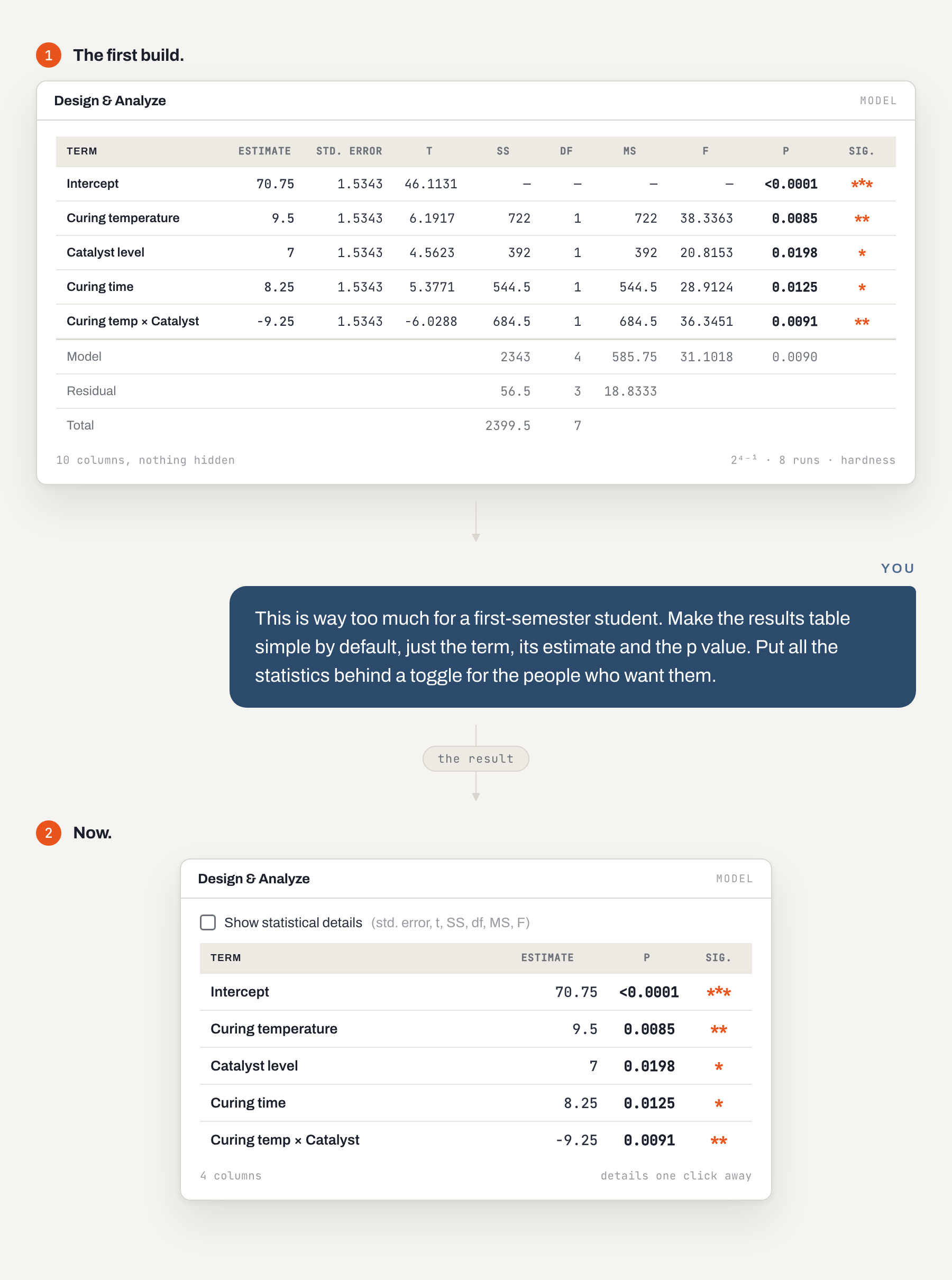
That was it. I had an idea I could describe. I had context to give (in this case the design language of my brand, so the tool would look the way I wanted). And I had a way to verify the outcome. That’s all you need.
Recipe calculation
The second example is from my daily practice at HOBUM. Calculating coating recipes, mixing ratios, solid contents and so on, isn’t really difficult. But it always took so much time and was just annoying. Especially with a DoE plan you just generated. That plan is only a table. It tells you that the first experiment runs binder type 1, at the low concentration, with a stoichiometric ratio of 1:1.05. It does not tell you how much of each ingredient you have to weigh into the container. So someone (me) had to turn the factors and levels into an actual recipe. I hated that part. So I thought, why not let an agent do it for me?
And it actually works really well. I don’t do recipe calculations anymore, and you don’t need much to get started. Only two things.
- Calculating stoichiometric ratios or solid contents or anything else requires proper context. So I created machine-readable material datasheets. Claude can do that for you. Just give it the PDF files and tell it to make a markdown version.
- Let Claude create a reusable script for the calculations. LLMs are probabilistic, they don’t calculate like we do. During training they read many times that 1+1 = 2. So if you ask them what 1+1 is, they think “I often read that 1+1 = 2, so most likely that is the answer”, without doing the maths. This is not really a problem anymore, because today they are smart enough to “use a calculator”.
I also gave Claude an output format for how I want the recipes structured, but that’s it.
Usually the best way to start is with an example. Give Claude Code (or Codex or any other tool for that matter) a DoE table and ask what it needs from you to calculate the recipes. Then go with the flow. When you are done, ask it how to reuse the workflow next time. Don’t forget to verify the workflow from time to time.
A knowledge hub
This one I am still building, and it is pretty cool. I think more companies should experiment with it.
At HOBUM, all the knowledge I produce lives in project folders (I guess that’s also the case in most other companies). For each project I write a report and share it with my colleagues, for example with sales. They need to know our products to give a customer the right recommendation, or to help them fix a problem. But when they sit with a customer who asks which of our polyols is the hardest, or which one has good adhesion on polycarbonate, they have to remember whether that was in one of my reports, or ask me after the meeting. And every new colleague needs the same extensive training over and over, just to remember all of it.
The knowledge hub lets them answer that themselves, while they are still in the meeting. Every result from every project goes into a database, and the hub is generated from it. It is basically a website with all the experimental results we recorded over the years, in a simple and nice layout that lets you compare products and get the information you need. You can also see the formulations we used for testing. And if the same product was tested in different formulations, you can see how the other ingredients influenced the result.
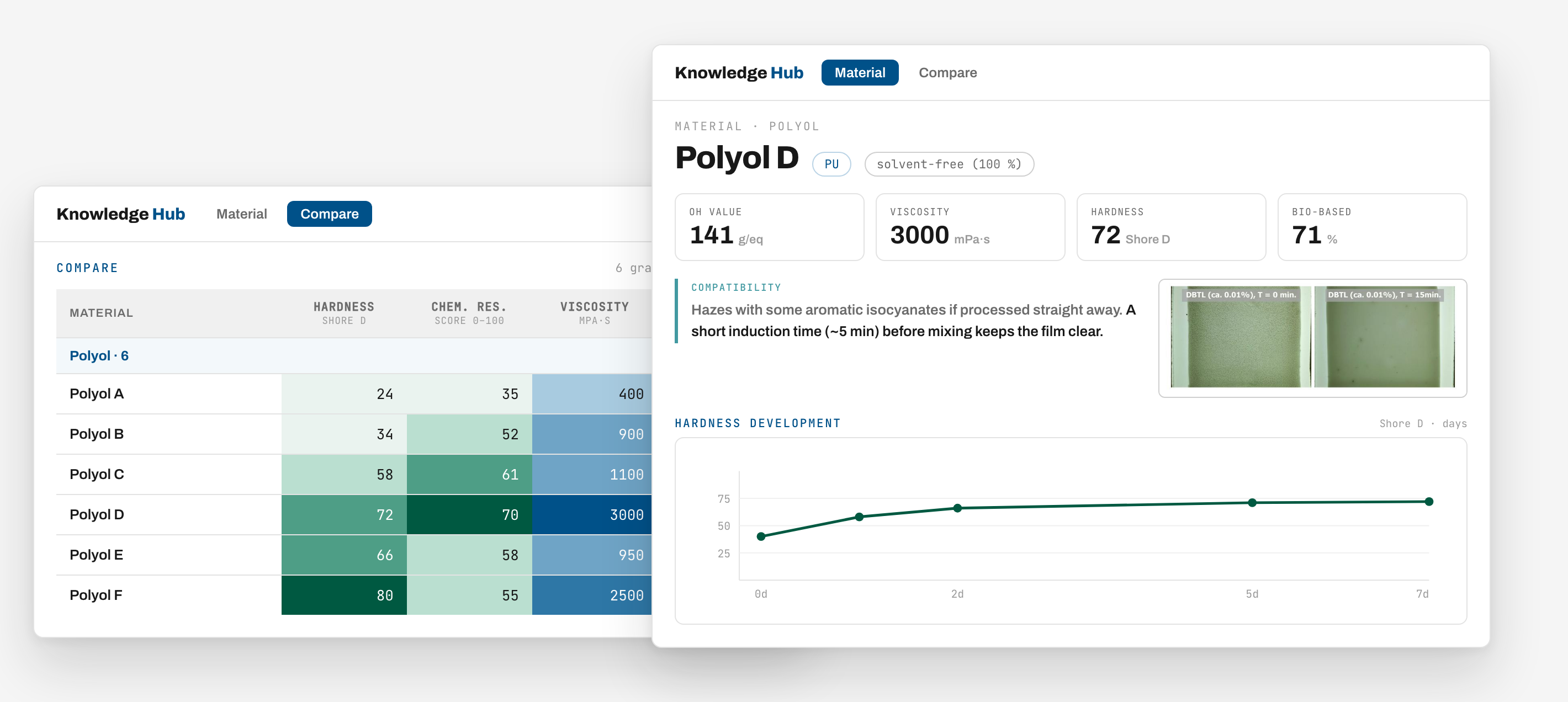
The technology for this has been around for decades. It is just a database and a website. I only could not have built it myself. Today I can. I only need:
- Well structured projects. It helps if all of them are in the same format, with templates for recording the results and so on. You can use Claude Code to set this up. And if you have legacy projects that are somewhat unstructured, Claude Code can bring everything into the same form (I did that. Takes some time but works well).
- A database where you save the results. I just told Claude Code to set up a database with the results from the projects. It figures everything out itself. I don’t have any technical ability but it just works fine.
- Taste when it comes to building the hub. There’s a lot of data going into it and it’s important to think about what the best way is to display this data in a useful way.
- Good judgement about whether the data on display makes sense. That’s the verification step.
Again, you really don’t need any technical ability. A colleague of mine is building a web app for her department right now, and she has never programmed before. That’s how easy it is. Contact me if you need help getting started but once you have that starting point I promise you it’s really easy to improve and maintain.
Start with the annoyance
So if you still don’t know what to use AI for, you are probably not annoyed enough by the work you do. Or you are so used to the annoying parts that you stopped noticing them. Go through your last week and look for them. What did you do that you hated? What did you not even consider fixing, because you thought you can’t?
Then take the smallest one of those and install Claude Code or Codex. Describe the annoyance, tell it what you have, and ask what it needs from you to fix it.