Make the output yours
Write down who you are and how you want things done.
Why the report was generic
Claude didn’t know how you work.
It has never seen one of your reports. It doesn’t know how you write. So the result was generic.
But you can give Claude an onboarding file to fix this. Similar to how you would do it with a new colleague.
Put the data back in a new folder
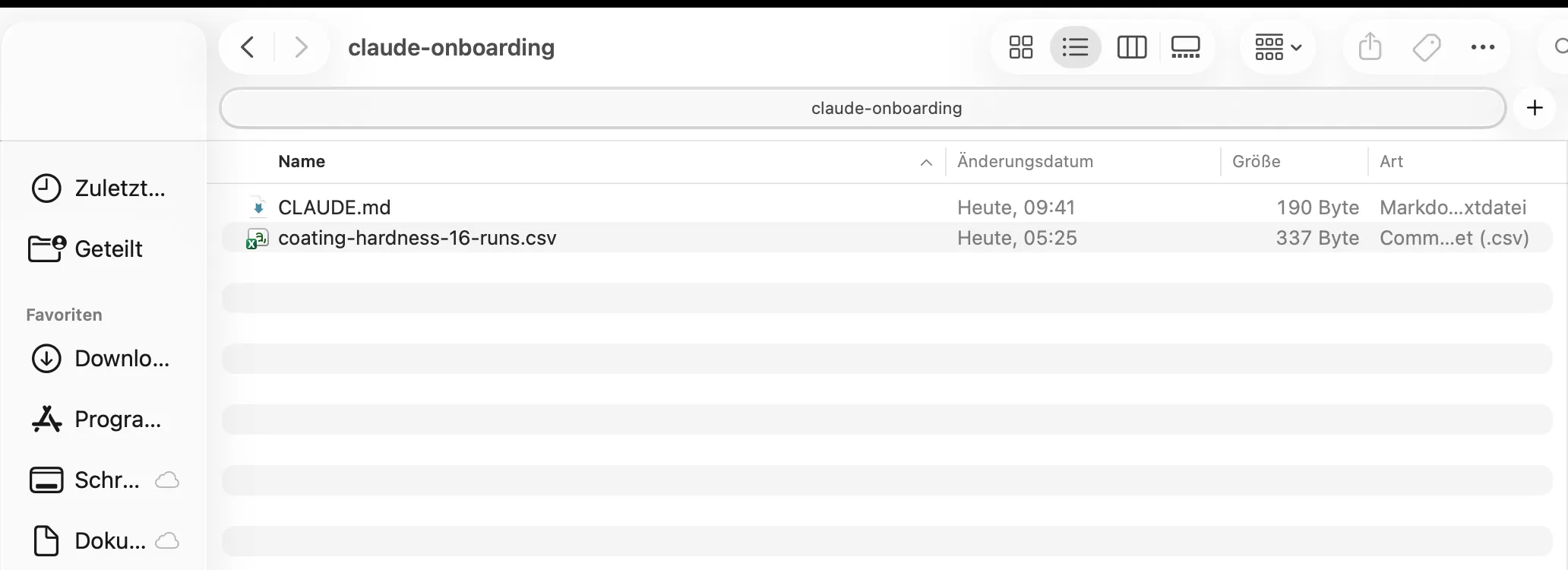
Make a new folder on your desktop and call it claude-onboarding. Download the CSV again and put it in there.
The onboarding file is called CLAUDE.md
Claude reads it every time, before it starts working. You need to put it directly into the claude-onboarding folder so that Claude finds it. Don’t put it in a subfolder.
What the .md means
.md is a file format, like .xlsx or .docx. It’s called Markdown.
A Word file is your text plus a lot of hidden formatting that Claude needs to unpack first (fonts, styles, tracked changes).
Markdown is much simpler. Just the text, with a few marks for hierarchy:
# A heading

Some text.

- a list item
- another one

**bold**
Claude has nothing to unpack. That’s why it handles Markdown better than Word.
Let's create a CLAUDE.md file
Claude usually writes too much and uses too many em-dashes.
So that’s the first thing I add. A how-to-write guide. Tell Claude this:
Please create a CLAUDE.md for this folder. Put in the following:

# How to write

In general, keep it short.
Never use em-dashes. Use a comma or split the sentence.Edit the file by hand
Open CLAUDE.md to edit it. The more work you put into this file, the better the output.
Add a line about yourself, for example:
I'm Marcel, a coatings engineer at HOBUM Oleochemicals. You are my research assistant.Now Claude knows who it is working with and what its role is.
Ask for the same report again
Let’s see what the new file changes. Start a new session. Make sure the folder at the bottom left is claude-onboarding.

Then send the same prompt as last time:
The folder contains data of a DoE I performed. Please create a summary technical report as html file.Compare the new report to the one from the previous tutorial. What do you think?
Don't put everything in CLAUDE.md
The writing rules you just added apply to every text Claude writes for you. Reports, emails, LinkedIn posts.
Instructions that should not apply for everything but only a specific task should not go into CLAUDE.md. They go in a skill.
What a skill is
A skill is the instructions for one task. How to structure and write a report, for example. Claude reads it only when that task comes up.
Putting that information into CLAUDE.md would be distracting if you want Claude to do anything else.
Skills are not saved in the project folder directly. Claude looks for skills in .claude/skills where each skill is a separate folder (you can have as many as you like):
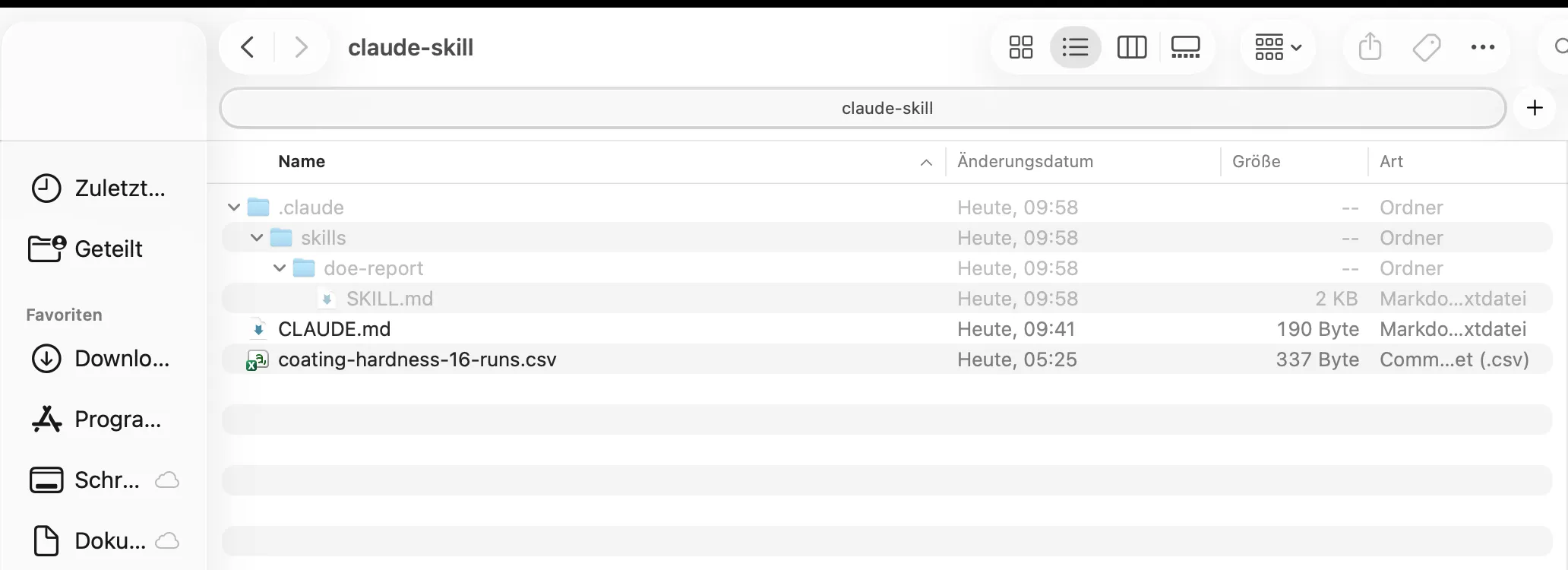
SKILL.md is where you write everything down that is important for the task you want Claude to do. It is the only file required. Everything else is optional.
The .claude folder starts with a dot, so Windows and macOS both hide it. On a Mac, press ⌘ + Shift + . in Finder. On Windows it’s File Explorer, then View, Show, Hidden items.
Create your first skill
Tell Claude how you structure your reports. Keep it simple for now:
This is how I want my reports structured:

TL;DR
Introduction
Results
  - Main effects
  - Two-way interactions
  - ANOVA
  - Residual analysis
Interpretation
Summary

Please create a simple skill for it scoped to this project only.
A skill can be available for a project or globally. The prompt says “scoped to this project only” because I don’t want the report skill everywhere.
Open SKILL.md and read it
Go to .claude/skills/doe-report and open SKILL.md.
Mine looks like this:
---
name: doe-report
description: Write up a DOE / experimental data analysis in Marcel's standard report structure (TL;DR, Introduction, Results with main effects, two-way interactions, ANOVA, residual analysis, Interpretation, Summary). Use whenever reporting results from a designed experiment, factorial dataset, or statistical analysis of lab data.
---

# DOE report structure

Use this exact section order. Do not add or rename sections.
```
TL;DR
Introduction
Results
  - Main effects
  - Two-way interactions
  - ANOVA
  - Residual analysis
Interpretation
Summary
```

## What goes in each section

**TL;DR** — 2 to 4 bullets. The answer first: which factors matter, best settings, effect sizes with units.

**Introduction** — Goal of the experiment, response variable, factors and levels, design type and number of runs. Short.

**Results** — Numbers only, no interpretation.
- *Main effects*: effect estimate per factor (high level mean minus low level mean), with units. Table or list, ranked by magnitude.
- *Two-way interactions*: interaction estimates, and a cell-mean table for any that matter.
- *ANOVA*: source, DF, SS, MS, F, p. Only display the final ANOVA table obtained through backward elimination.
- *Residual analysis*: normality, residuals vs fitted, residuals vs run order. Report outliers with run numbers.

**Interpretation** — What the numbers mean for the coating system. Link effects to chemistry or process. Name recommended settings. State limitations, e.g. no replicates, no curvature check, restricted design space.

**Summary** — Short paragraph, no bullets. Restates conclusion and next step.

## Rules

- Keep it short. No em-dashes, use a comma or split the sentence.
- Always give units and the direction of an effect.
- Report exact p-values, not just "significant".
- Flag confounding and aliasing when the design is fractional.
- State assumptions you had to make about the data.
- If a section has nothing to report, keep the heading and say so in one line.Yours will be different. It is a draft, same as CLAUDE.md, so edit it however you like. Shorter is better.
The name is what you type if you want to ask for the skill directly. You don’t have to. Claude reads the description underneath and decides for itself when the skill fits, so I’d leave that line alone. It usually works.
Ask for the report one more time
Let’s see what the skill changes. Tell Claude to apply it:
Please revise the report you just created. Apply the new doe-report skill.What do you think so far? Tell me.
Make skills for the work you repeat
You can either create skills up front, the way we just did. Or backwards where you do the task together with Claude once, fix the output until it’s right, then tell Claude to turn that into a skill.
I usually take the second one. Then the editing matters more, because Claude writes down too many details. The model is smart, don’t micromanage it.
Give your agent autonomy
Claude knows now how you prefer your writing and how to structure a report.
The next tutorial is about how to create a folder structure that lets your agent completely work on its own, with you only giving instructions on what to do.
Email me when it’s available →Steps last checked 2026 · 08 · 16. If one no longer matches what you see, tell me.